You care about every stay.
Daybook keeps track of every detail.
By the time you’re up, Daybook has already checked your cleaners, your gaps and your guests, across every property you list, so your morning check takes thirty seconds, not thirty minutes. If it couldn’t read something, it tells you that too.
Reads your Airbnb, Vrbo and Booking.com calendars, and the booking emails you forward.
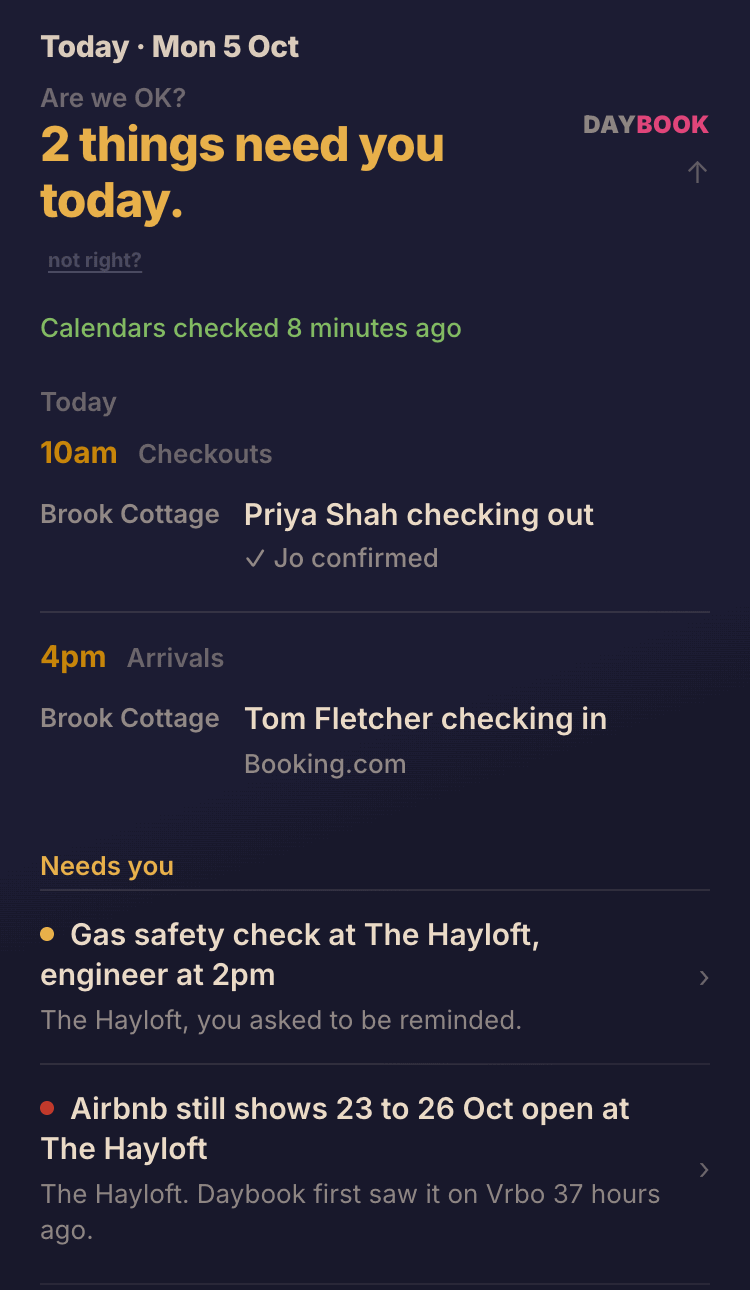
Monday morning in Daybook, with made-up places, guests and times. Two things need the host: a reminder they left themselves, and a Vrbo booking that Airbnb still shows as open.
You check four apps before breakfast. Daybook has already looked.
Most hosts start the day the same way: Airbnb, then Booking.com, then Vrbo, then WhatsApp. You look at who is arriving, whether the cleaner knows about Friday, whether anyone cancelled overnight, and whether the booking that came in on one site has been blocked on the others.
None of that earns you anything. You do it because you can't quite be sure everything went through. Daybook does those checks for you, from the calendars and emails you already have, and puts the day on one page: who is leaving, who is arriving, and anything that needs you. Most mornings, nothing does.
It doesn't run your lets for you. You still decide everything and you still send every message. You just stop carrying all of it in your head.
Every calendar, checked against the others
Every five minutes Daybook reads each calendar you connect: Airbnb, Vrbo, Booking.com, and your agency's or channel manager's if you use one. When a booking from another site, or one you added yourself, still shows as open on Airbnb four hours later, Daybook tells you exactly which nights to block there. The checkout morning stays open for the next guest.
If two bookings ever land on the same night, a red banner above your calendar names both guests.
Before you say yes to a direct booking
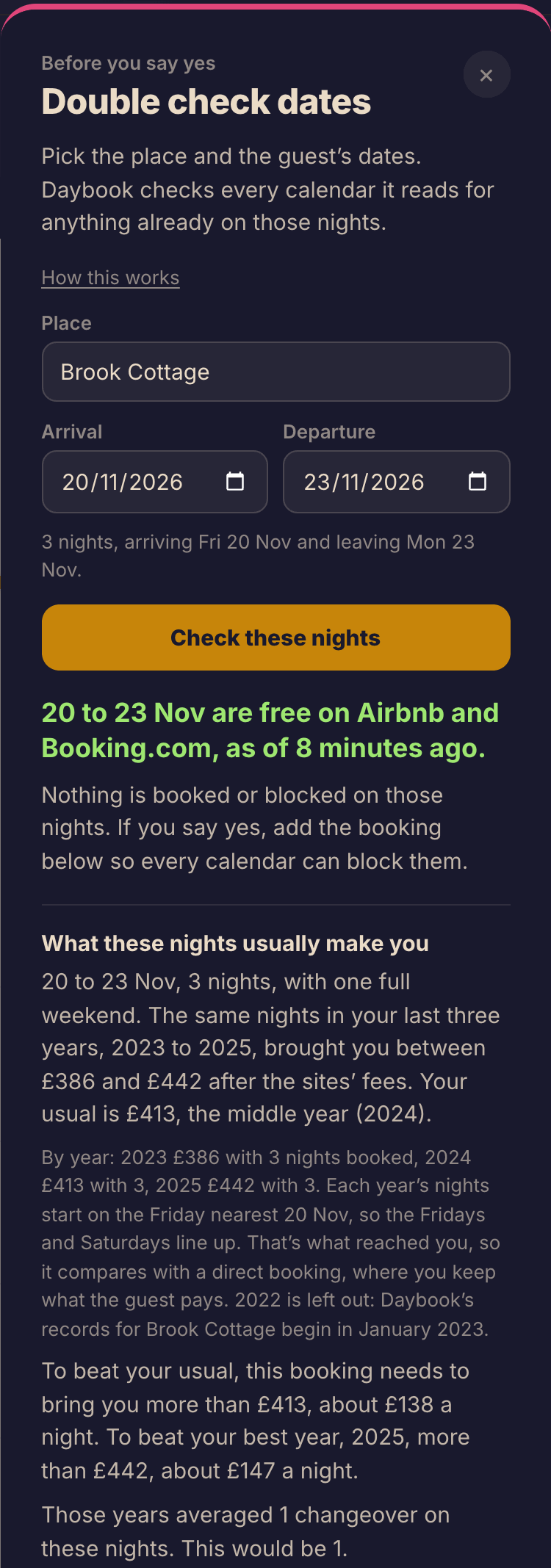
A guest who stayed last year asks for three nights in November. Put the dates into Double check dates and Daybook looks at every calendar for those nights and tells you whether they are free. Once your past bookings are in, it also shows what the same nights made you in other years. If you say yes, add the booking there and it goes straight on your board.
The message is written. You send it.
When a booking comes in, Daybook writes the message for your cleaner: which place, which day, what time the guests leave, and a link to their own schedule. You open it in WhatsApp or as a text and send it from your phone, so it comes from you. Nothing is sent automatically.
What your board says about each clean, in order:
Message prepared for Jo
You opened the message to send it. For twenty minutes you can undo that, in case you didn't send it after all.
Sent to Jo, no reply yet
You sent it and Jo hasn't answered. Daybook doesn't pretend otherwise.
Jo knows
Only once Jo has confirmed the clean on their own page. Daybook can't read your WhatsApp, so a YES there is yours to see.
Is October as good as last year?
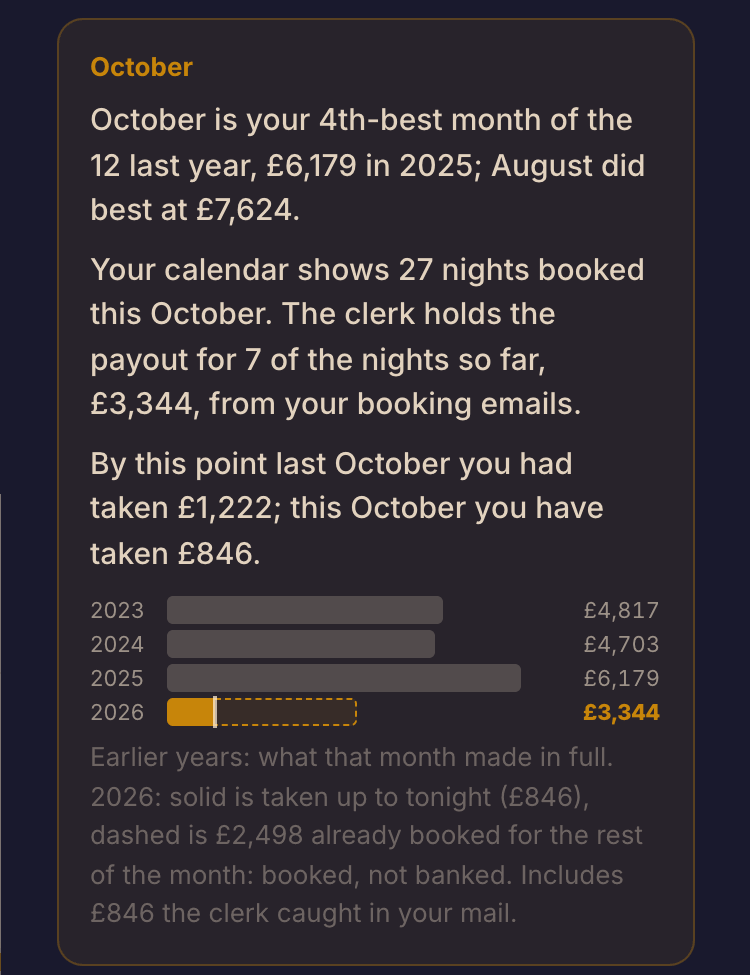
Daybook puts each month beside the same month last year, using your income after commission: what each stay brings you once the sites' fees are off. When a month is behind, it says why: fewer nights booked, or the same nights at a different price. It names what it is comparing against, so you can check it.
The morning after you upload your past bookings, it writes a first read of your places: your best months, who your guests are, and how you price. Every Friday a letter on your board says where you stand, and early each month it puts the last month in the books and sets up the next.
It never tells you what to charge. It shows you what your nights have earned and leaves the price to you.
A guide in your words, written one page at a time
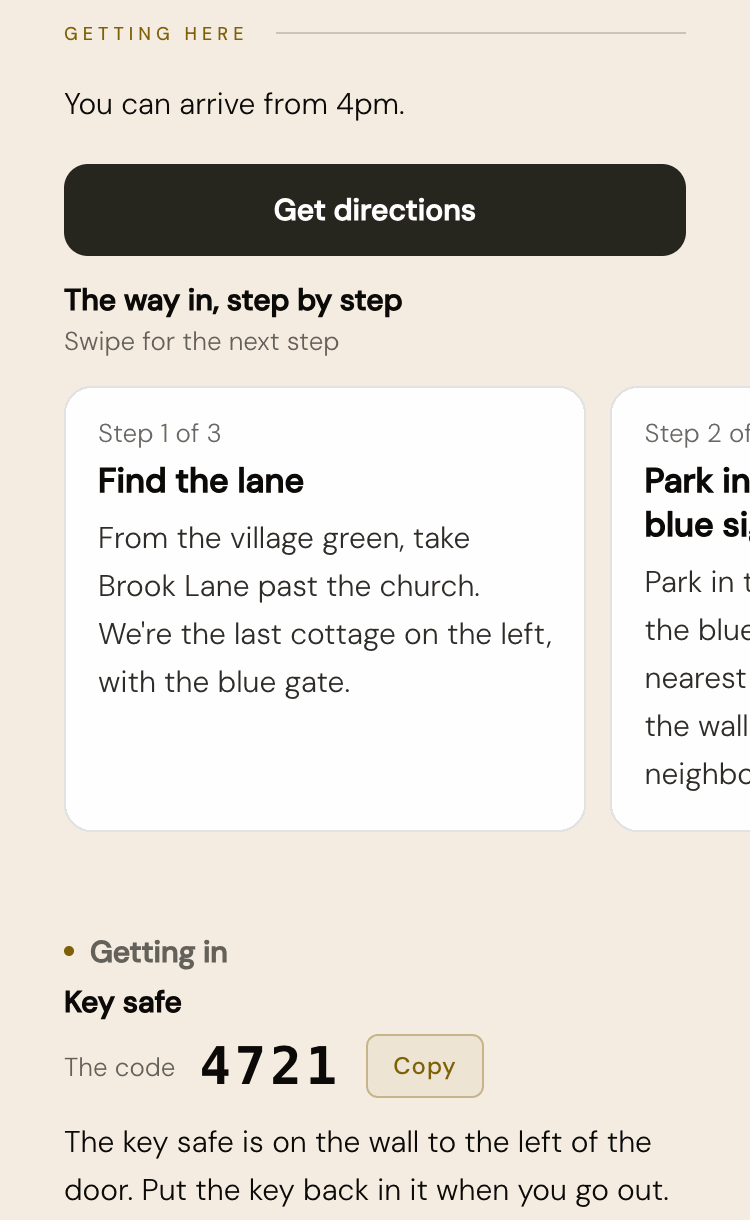
The guide editor takes you through it a page at a time, in the order a guest meets your place. Getting here is the page guests read most: the way in is a row of photo steps, so you can show the turning, the right parking space and the front door. House rules sit at the front, then the questions guests always ask, then the house room by room, then the places you love and why you love them.
Already have an area guide as a PDF? Upload it as it is. Each stay on your board has its own guide link to send the guest, and it shows the door code and WiFi only from 2 days before they arrive until they leave. Print a card for the door so guests can open the guide with their camera. When a guest taps Yes, we're in, you see it on your board.
Small things that add up
Reminders you can say out loud
Tap Add a reminder and say it: the boiler service on Tuesday, more towels before half term. Daybook files it against the right place and brings it back on the day.
What changed overnight
Since you last looked shows the bookings added and cancelled since you were last on it, whether that was on your phone or your laptop.
Everything about a booking
Tap a booking to see what Daybook knows about it: where the name came from, your income after commission, whether your cleaner knows, and your own notes.
What Daybook doesn't do
It is better you hear this now than find it out later.
- It doesn't change anything on Airbnb, Vrbo or Booking.com. It reads your calendars and never updates your availability or your prices. Keep the sync you already have between the sites. Also paste Daybook's calendar link into each site, so a booking you take directly blocks every site. Daybook tells you on the morning a site hasn't copied a booking.
- It doesn't send messages for you. Not to guests and not to your cleaner. It writes the message and you send it.
- It doesn't tell you what to charge. It shows you what your nights have earned.
- It says when it can't be sure. A calendar it couldn't read, or a month with too little history to compare, is said in words rather than left blank.
What you'll need
Your phone, your email, and the app or website for each site you let through. Most of it is copying a calendar link from each site and pasting it in.
Sign in with your email
No password. Daybook emails you a link to tap.
Tell it about each place
Its name, who cleans it, and the fees guests pay, so the figures are true.
Paste your calendar links
From Airbnb, Vrbo, Booking.com, or your agency.
Forward your booking emails
To in@daybookforhosts.com, so Daybook knows who is coming and what they paid.
Upload your past bookings
The next morning, Daybook gives you its first read of your places.
Built by a host
Daybook is made by Anthony Williams, a holiday-let host in Wiltshire. If you email hello@daybookforhosts.com, he reads it.
See your own morning in Daybook. You don't need a card.
£15 a month after the free trial, everything included. The first 50 hosts who pay become Founding Hosts and keep £15 a month for as long as they stay.